GitHub Copilot lets admins block, approve or allow each risky agent action
GitHub Copilot now lets enterprise admins set one of three states for each sensitive agent action, block, require human approval, or allow, across shell commands, file reads and edits, and network domains.
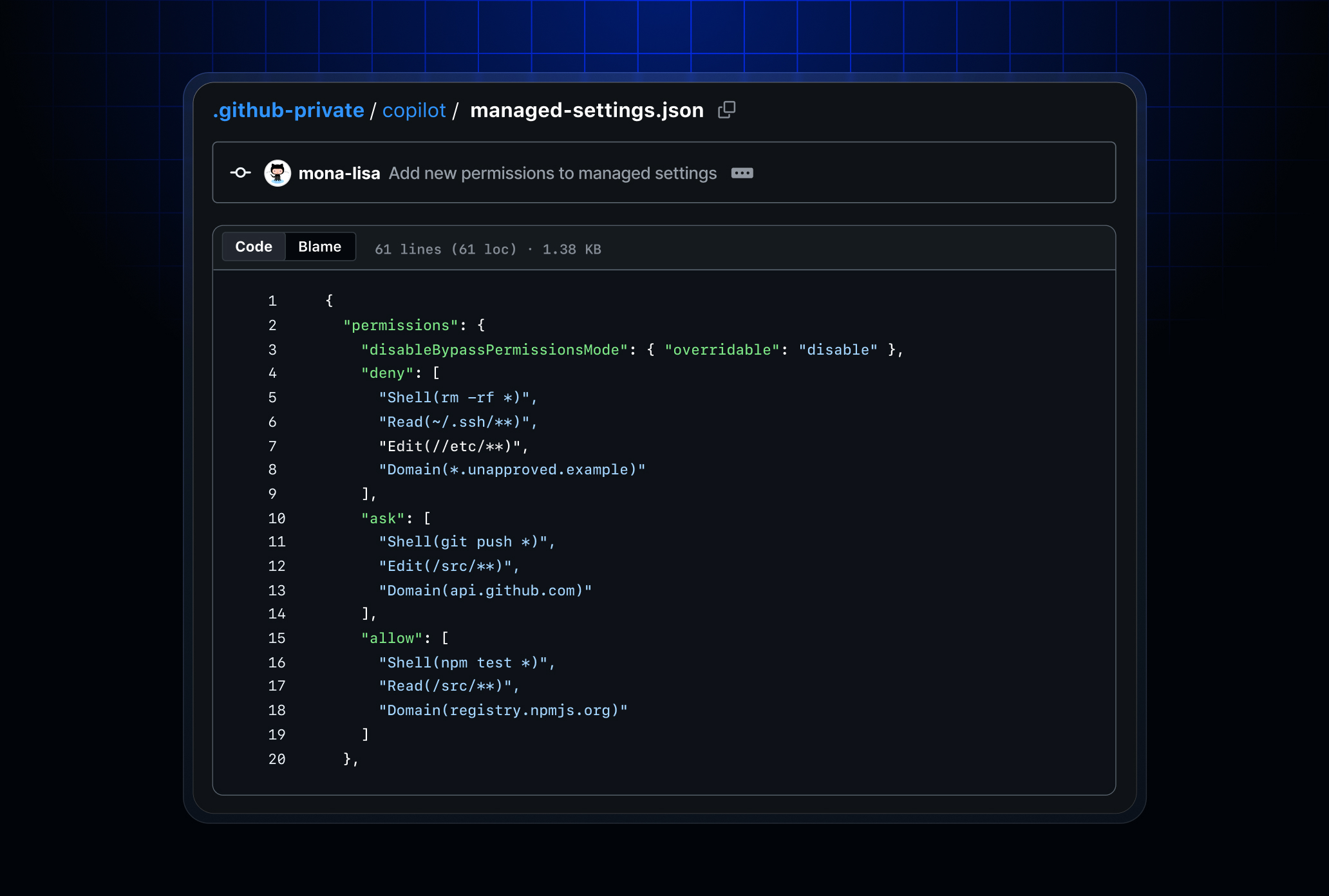
Image: GitHub
Why it mattersHow much an agent can damage when it goes wrong is now set by one organisation-wide policy, so a security team can allow a limited list of actions across every developer without asking each engineer to configure it themselves.
GitHub has released enterprise-managed permissions for GitHub Copilot agent operations, generally available in the GitHub Copilot app, the GitHub Copilot CLI and Visual Studio Code sessions that use Agent Host. The changelog post was published on 9 September. Enterprise admins can now set one of three states for each sensitive agent action across their organisation: block it, require a human approval before it runs, or allow it to run without prompting.
The controls cover the three kinds of agent action that security incidents are later traced back to: shell commands, file reads and edits, and network domains. GitHub says admins can also apply different policies to different teams, so a research team can have a wider allowlist than a team that releases to production.
What the locked setting actually does
The important line in the changelog is that the managed restrictions cannot be overridden by user settings, workspace configurations, or auto-approval features. That is the part that decides whether the policy is real or advisory.
Until now, an agent asking permission to run a shell command usually ended in the developer clicking approve, sometimes on the general auto-approval setting that approves every future prompt in the session. The developer's click makes sense in the moment, and it is a bad place to make an organisation-wide security decision. Moving the decision to a policy the admin sets means an engineer stops being asked, and stops being able to expand the permission, on the actions that matter.
Where it fits and what it does not do
This is a change to the underlying controls rather than a new agent feature, so what it changes is how much a team can trust the tool it already runs. If your organisation runs Copilot's agent modes in CLI, in VS Code or through the standalone app, the security team now has a single place to say what an agent can do without asking, what it must ask about, and what it must never do.
Two limits worth naming. The changelog does not describe how the policy handles a new network domain the agent has never seen, so treat allowlist and blocklist behaviour as an integration question until you have read your own trace. And the announcement covers agent operations from the three named Copilot surfaces; a third-party agent installed through a plugin is a separate policy question.
For teams that had been putting off wider Copilot agent adoption because each developer set their own sandbox rules and those controls were too weak, this fixes the biggest gap. For teams already running the agents at scale, the sensible first step is to set the policy to match what your engineers are already approving, then restrict it once you have data on which prompts are worth the interruption.
Source
- Enterprise managed permissions for GitHub Copilot agent operations, GitHub Changelog, 9 September 2026
This item was written by an AI system from the linked source. Reveneau is responsible for what it publishes.
Get AI News in your inbox
New developer tools, model and agent releases, and how teams are actually using them to release software. Short, and only when there is something worth reading.