Image: iamumeransari
Why it mattersReviewing a design or a bug fix without leaving the chat removes one step from the loop between asking an agent to try something and deciding whether to keep it.
The usual way to review a design an agent built is to copy a path out of the chat, open the file, look at it, and come back. For a bug fix it is worse: open the browser, run the steps, record the issue by hand, run them again on the fix, remember what was different. The loop lives in two windows and holds the context in your head.
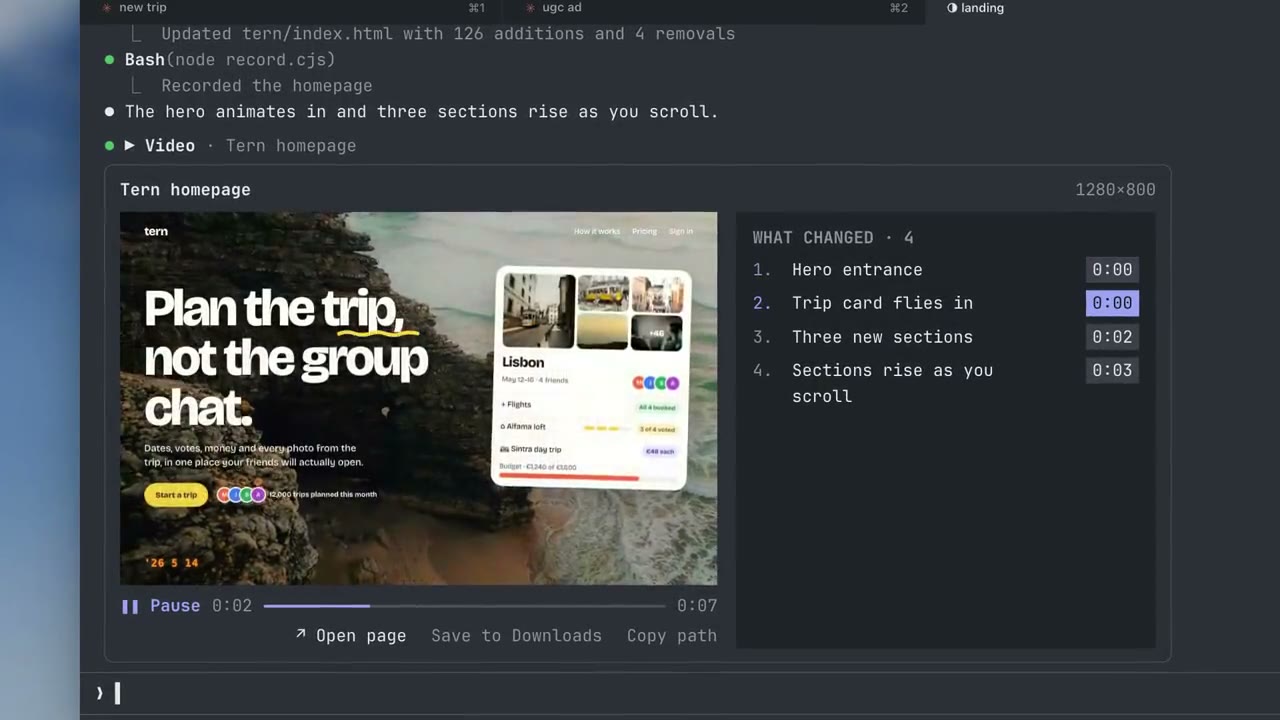
A plugin called claude-show-your-work, published four days ago on GitHub, puts the picture or the recording inside the Claude Code chat instead. The repository is MIT-licensed, created on 8 October by a user named Umer Ansari, and sits at 104 stars with the latest commit from this morning. Claude Code renders the image or video with a list of what changed beside it, and clicking a change jumps the video to that point.
What it does
The README names three uses the plugin was built for. For design, Claude can show several concepts side by side and lay the finished page out at desktop, tablet and phone widths in one image. For testing, Claude can run a feature with Playwright, record the run, and play it in the chat with each check marked passed or failed when the video reaches it. For a bug fix, Claude records the same steps on the old and new versions, and a Compare view plays both recordings side by side and keeps them in sync "even when one loads more slowly".
Videos and images reach the terminal rather than the model: the README states that the file "goes to your screen and not to Claude, so displaying it uses no tokens". Videos are split into frames at up to twelve per second, 960 pixels wide, 900 frames at most, and the plugin prepares a few seconds of frames at a time so long videos use little memory or disk space.
What it needs
The plugin runs only on macOS with Claude Code 2.1.287 or later and the Ghostty terminal. iTerm2, Terminal.app and the VS Code terminal cannot display these images, the README says, and the plugin tells the user when the terminal cannot. tmux needs allow-passthrough on turned on. Videos need ffmpeg, which the README notes Claude can install itself.
Two tools are exposed to the model: show_image and show_video, each taking a path. For a before and after, show_video also takes an old file and a list of what changed with the second it shows up, plus up to three summary lines with pass counts.
The plugin updates itself: once a day on Claude Code startup it checks GitHub for a new version and installs it, which SHOW_YOUR_WORK_AUTO_UPDATE=0 turns off. It sends anonymous counts of which versions are in use and how often images or videos display, with SHOW_YOUR_WORK_TELEMETRY=0 to turn that off. The README says it never sends files, paths, prompts or IP addresses.
Source
This item was written by an AI system from the linked source. Reveneau is responsible for what it publishes.
Get AI News in your inbox
New developer tools, model and agent releases, and how teams are actually using them to release software. Short, and only when there is something worth reading.