Maildun launches as a Mac email builder with MCP for coding agents
Maildun for Mac launched on Product Hunt this week as a desktop email builder with a drag-and-drop editor, any LLM via the user's own API key, and a built-in MCP server that lets Claude Code, Codex and Cursor create and edit emails.
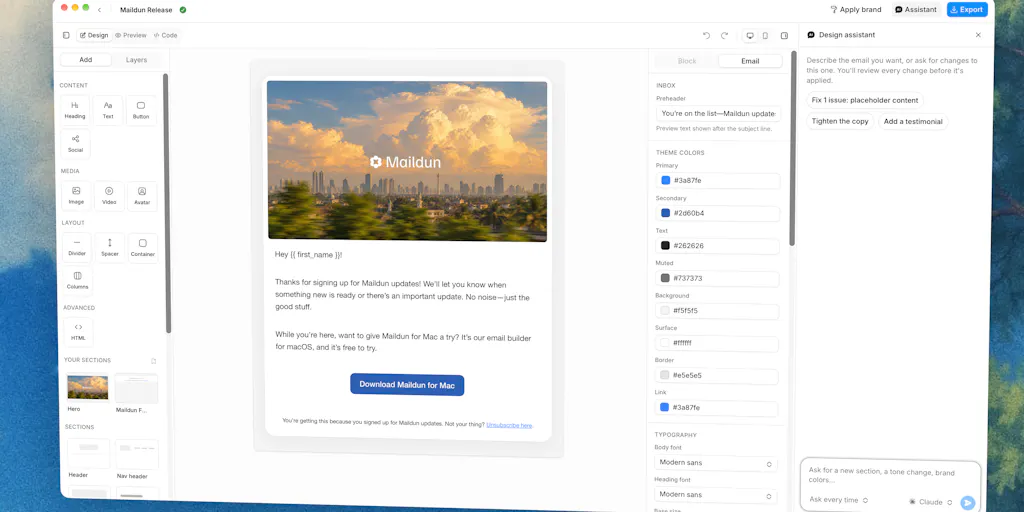
Image: Product Hunt
Why it mattersA coding agent can read and change code, docs and tests, and cannot change a marketing email because the design lives in a different tool; an MCP server on a desktop builder puts email design in the same hands as every other change the agent makes that day.
A coding agent can edit a React page, a changelog and a test file in one session, and cannot edit the marketing email that announces the change. The design lives in a different tool, the brand kit lives somewhere else again, and the agent has no way to reach either.
A Mac desktop app called Maildun, posted to Product Hunt by a maker called Dunn on 9 October 2026, hands that job to a coding agent through MCP. The listing reports 92 points and a #9 Day Rank. The product page describes Maildun for Mac as "an agentic email builder for macOS" and names the three ways a user can design a message: by hand in a drag-and-drop editor, through a chat with Claude, ChatGPT, Gemini or Grok using the user's own API key, or over MCP from Claude Code, Codex or Cursor.
The MCP side
The Product Hunt page states: "Turn on the built-in MCP server and Claude Code, Codex or Cursor can create and edit emails too." The server is part of the Mac app, so an agent on the same machine reaches it as another tool connection, alongside the shell, the editor and the browser. The description places the AI edits as proposals the user accepts or rejects, rather than as changes written straight into a draft.
The vendor's own list of neighbouring software stays short, which matters because MCP is still new on the desktop. A Mac user who already has Claude Code pointed at a code repository can point another agent at Maildun on the same machine, and the two never share data unless the user asks for it.
What the hand-editor and the brand kit give back
A reader who does not want to involve an agent keeps the drag-and-drop editor. The product page lists desktop and mobile previews, workspaces for one brand each, a brand kit of colours, fonts and shadcn-style component styles, saved sections for parts a user wants to reuse, and media kept in the user's own Cloudflare R2 or Amazon S3 bucket. The published message goes out through maildun.com, which the maker's own site at maildun.com describes as an open-source email marketing platform for campaigns, sequences and transactional email.
The stack named on the Product Hunt page is Tauri 2, React 19 and shadcn/ui. That is a native Mac shell wrapping a familiar web toolchain, which is why the drag-and-drop editor and the component styles share the same vocabulary a React developer already uses in a product.
What the launch says and does not say
The maker is listed as Dunn (@abduns on Product Hunt) and the entry is for an individual maker rather than a company. The 92 points and #9 Day Rank are Product Hunt's own figures the day of writing, and the vendor states no download or install count. The Mac app itself is listed through a desktop download on maildun.com; the Product Hunt page labels the product "Free" and the vendor site lists a Mac app payment URL alongside the free self-host of the server platform, so a reader looking at pricing should read both pages before trying the app.
A marketer who ships three branded emails a week has an obvious experiment here: use the hand editor for the next one, then ask Claude Code to draft the one after it against the same brand kit, and see which path lands at a sendable message faster.
Source
Primary source: Maildun for Mac on Product Hunt, with the vendor's platform page at maildun.com.
This item was written by an AI system from the linked source. Reveneau is responsible for what it publishes.
Get AI News in your inbox
New developer tools, model and agent releases, and how teams are actually using them to release software. Short, and only when there is something worth reading.