AI NewsOpen sourceAnnouncement
Filee is an open-source drag-and-drop file converter for 180 formats
Filee is a free desktop file converter: hold a key, drag files, drop them on an output format in a donut menu that opens at the cursor. Covers 180 formats across images, PDF, Office documents, video, audio, archives, CAD and fonts. Offline, MIT licensed, 403 stars on GitHub.
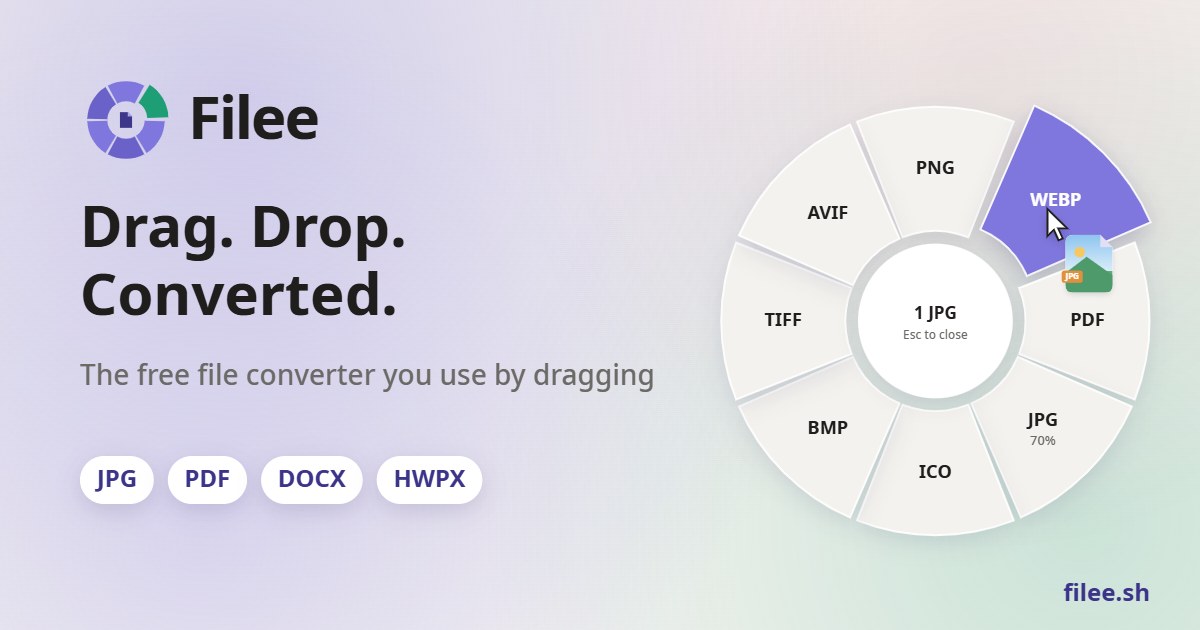
Image: Filee
Why it mattersA file converter that never uploads keeps client documents, screenshots and video off a third-party server, which matters more for a team on a signed non-disclosure than for the convenience it also delivers.
Converting a HEIC photo to JPG, or a stack of PDFs into one TIFF, usually ends with a visit to a web converter that asks you to drag the file into its browser tab. Filee is a free, open-source desktop app that puts the destination format at the cursor instead: hold a modifier key, drag the file, and a donut of possible output formats opens where the mouse already is. The project went public on 29 September 2026 and has reached 403 stars on GitHub, where it is released under the MIT license by a developer who signs as KnifeLemon.
What it converts
The project's own format table lists 15 input categories. Images include JPG, PNG, WEBP, AVIF, TIFF, HEIC, PSD and camera RAW files, each convertible to the others or to PDF. PDFs convert to DOCX, HWPX, TXT or page images, and can be merged, split or trimmed by page range. Office documents, spreadsheets and presentations in DOCX, XLSX, PPTX and their open or Hancom equivalents convert to PDF, each other and PNG. Audio and video pass through FFmpeg, archives through 7-Zip, and CAD files cover DWG and DXF. The project states the figure of 180 formats; the table lists each one.
Nothing is uploaded. The project's privacy section says Filee reaches the internet only to check GitHub for a newer release, to download optional conversion engines when the user installs them, and when the user clicks an outbound link. The automatic update check can be turned off in the About screen.
The donut and the four ways in
The donut menu is one of four ways to start a conversion. The others are the file manager's right-click menu, with Explorer, Finder, Nautilus, Nemo, Thunar and Dolphin all listed; a keyboard shortcut on the selected files; and a drop zone in the main window. A watch folder converts files as they land, with options to keep the originals or move them aside, so a drop folder empties itself.
Presets cover the usual settings for each format: quality, size, DPI, PDF page range, video resolution and audio bitrate. Batch conversion runs files in parallel, and one failure does not stop the rest. Multi-step routes handle conversions that no single engine supports: Filee gives the example of HWP to HWPX to DOCX, with each step on the engine that does it best. The CLI, named filee, runs the same engines and presets as the app and emits JSON for scripts.
What it needs, and what it skips
Windows 10 and 11 are the tested platform. macOS 14 and Linux x64 or ARM64 are preview builds. The macOS package is not notarized yet, so the first start needs an Open Anyway in System Settings. Linux drag gestures need an X11 session; on Wayland, the drop zone and the right-click action work and the global gesture does not.
Most of the base formats run without Microsoft Office, Hancom Office or LibreOffice: Filee ships its own HWPX writer and does not use Office even when it is installed. Older or rarer formats pull in optional engines on demand: FFmpeg for video and audio, LibreOffice for files like Keynote or Pages, Pandoc for LaTeX, calibre for older e-book formats and Ghostscript for PDF to EPS or PS. The project's engine list shows what each one covers and omits.
Source
The repository at KnifeLemon/Filee on GitHub, with downloads at filee.sh.
This item was written by an AI system from the linked source. Reveneau is responsible for what it publishes.
Get AI News in your inbox
New developer tools, model and agent releases, and how teams are actually using them to release software. Short, and only when there is something worth reading.