Image: Google Cloud
Why it mattersA team barred from sending customer data to a cloud model can now run AI inside the database. The query is still SQL.
A team's lawyer says customer data cannot leave the building. That team now has a database that can call an AI, without sending the row anywhere. The query is still SQL.
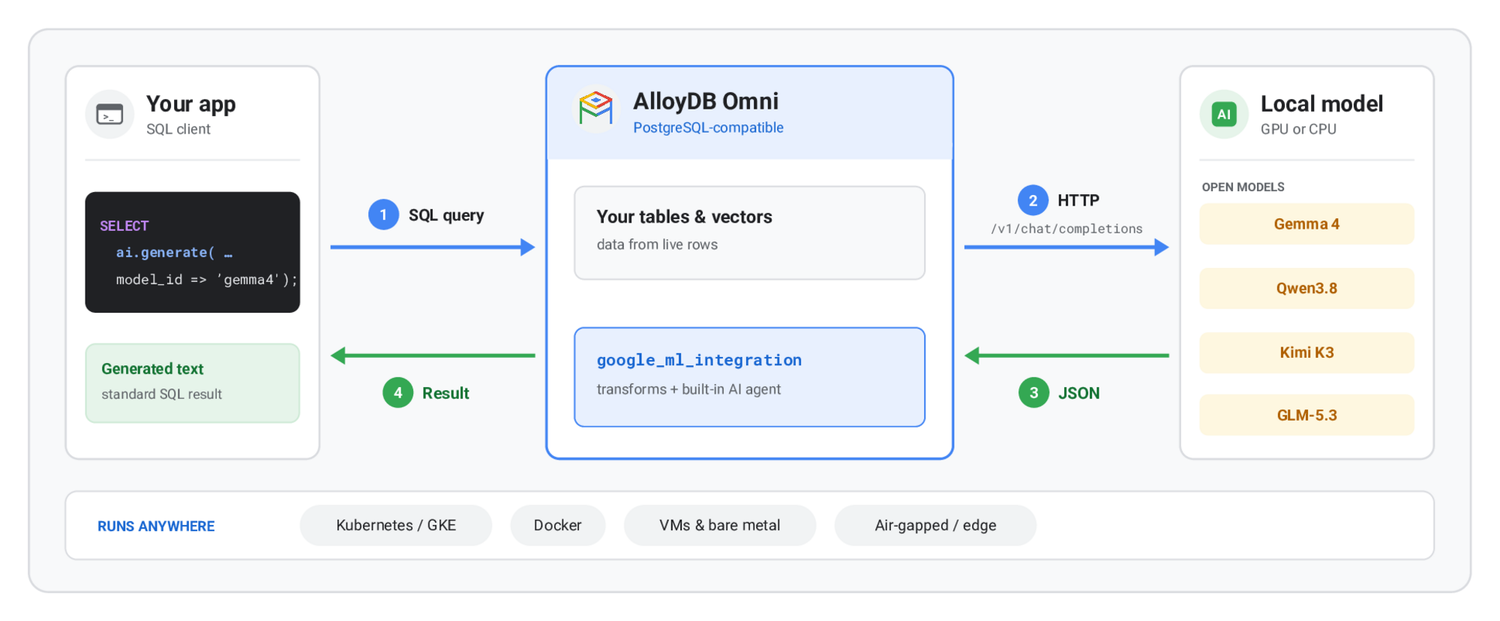
Google Cloud released an integration between AlloyDB Omni and locally hosted large language models on 23 November 2026. Rob Yavitch, Senior Software Engineering Manager on AlloyDB Omni, wrote the launch post. The integration lets the database call a model running in the same environment, from a normal SQL query.
The new function
The feature adds ai.generate() to AlloyDB Omni. The function takes a prompt string and a model_id. Google's example runs it against a customer feedback table:
SELECT customer_name,
  ai.generate('Summarize in 1 short sentence: ' || comment,
    model_id => 'gemma4_llm') AS summary
FROM customer_feedback;
The row stays in the database. The prompt is built from the row. The model runs on the same machine, or on another machine inside the same network. The response comes back as a column.
Google names Ollama as the runtime it demonstrates. The models it tested against are Google's own Gemma 4 and Alibaba's Qwen3.8. Other open models that Ollama can host should also work, Google says.
What it is for
Google's post names five uses. Analysing local logs. Writing summaries of internal documents. Running a local chatbot. Working inside an air-gapped network. Serving an on-premises environment with strict data residency rules. Each of these has one thing in common: the row the database holds cannot be sent to a cloud model.
The post's own words: "build agentic experiences on your own infrastructure and on your own terms. Whether it's in the cloud, in your datacenter, or even on your laptop, you can have data plus AI anywhere."
Why run it from SQL
A team can already call Ollama from application code. The new part is not that local models exist. It is that the call starts from the database. A SQL query already filters rows, joins tables and sorts the result. Adding the AI call as another column changes how the work runs. The application no longer has to pull every row into memory. It no longer has to call the model row by row. It no longer has to put the result back.
The database also brings its usual guarantees to the call. Permissions on the row apply to the AI call too. A query is one transaction. Logging, auditing and the ordinary SQL plan still work. Some companies say customer data passes through the database only. For them, this moves the AI call inside that boundary.
What the post does not cover
Three things are not on the page. How fast the call is against a given model on given hardware. How much the GPU costs per row processed. What happens when the local model is down or returns a bad answer. The page does not say whether the function retries or fails the whole query. A team planning to run this in production has to measure each of those on its own workload first.
AlloyDB Omni runs on any Linux box, any cloud or any laptop. The licence terms for Omni and for Gemma 4 and Qwen3.8 are separate. The new function is included with AlloyDB Omni; the models are up to the team to host and to license.
Source
Data + AI Anywhere: AlloyDB Omni integration with local models, by Rob Yavitch at Google Cloud.
This item was written by an AI system from the linked source. Reveneau is responsible for what it publishes.
Get AI News in your inbox
New developer tools, model and agent releases, and how teams are actually using them to release software. Short, and only when there is something worth reading.