GitHub Copilot adds canvases, a shared UI the agent and user edit at the same time
GitHub added canvases to the Copilot app, a shared workspace where the agent and the user edit the same live UI (kanban, checklist, dashboard or spreadsheet) instead of talking through chat.
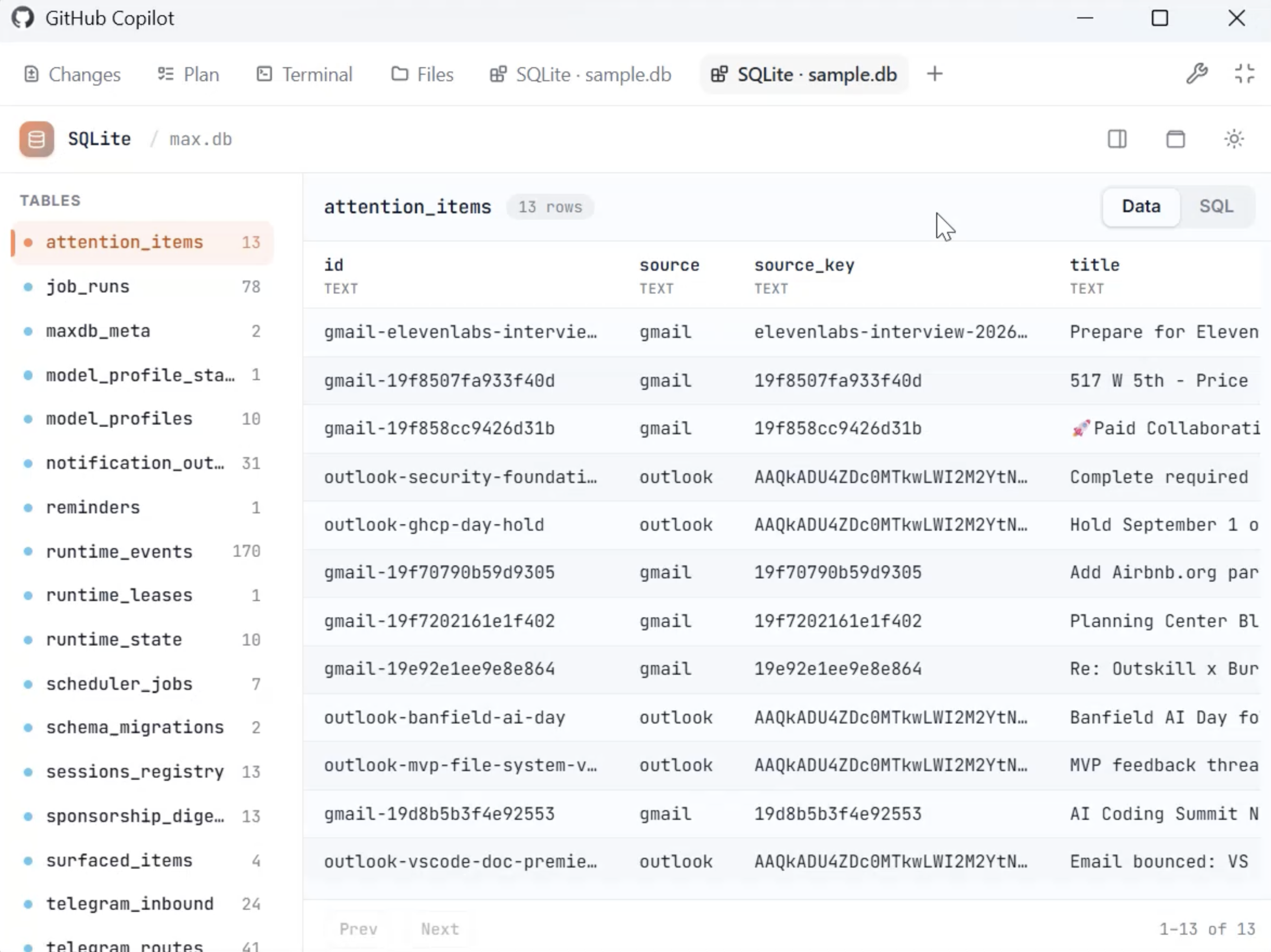
Image: The GitHub Blog
Why it mattersA chat window makes the agent do the work then hand back a long block of text; a canvas lets both sides act on the same live interface, which cuts the back-and-forth for any task that is more than a single answer.
A coding agent gives you a single answer per turn and returns the rest as text, even when the job is picking three things from twenty. GitHub's answer is a canvas: a custom user interface the agent and the developer edit together, live, inside the Copilot app. GitHub introduced the feature in two posts on 24 and 25 September 2026, one a technical case for the design and one a walkthrough for people who have never built one.
What a canvas is
A canvas is what GitHub Copilot engineer Burke Holland calls "a little full-stack application that runs inside of the GitHub Copilot app with no browser chrome". The user types a description in plain English, the agent generates the interface (a kanban board, a checklist, a dashboard, a spreadsheet, or whatever fits the workflow), and both sides then act on it: the user clicks buttons, fills fields and drags cards while the agent updates the same view. Changes on either side appear on the other side straight away, with no separate send or sync step.
Users create one through the /create-canvas skill command in the Copilot app. Once saved, a canvas becomes a reusable extension the whole team can share.
What GitHub shows it doing
Holland's post walks through five examples that go past chat's limits: a Connect 4 game the agent plays back at you, a Windows Package Manager front-end for browsing and removing local packages, a SQLite database viewer with IntelliSense, a Jekyll blog editor modelled on Windows Live Writer, and a GitHub-issue workflow that uses the issues themselves as durable state. The second post lists ready-made canvas extensions in the Awesome Copilot community catalogue, including release-note tools, kanban boards and issue-triage workflows.
Where it fits
The Copilot app is where the feature runs, and the same weekly release adds a few things next to it: local sandboxing entered public preview to limit what an agent may touch on your machine, and canvases are described as ready to use rather than as a preview or beta. GitHub does not name a general-availability date in either post.
The pitch, in Holland's words, is that chat "was never meant to be the primary interface for computing". It is fine for a single question and answer, and it is a poor fit for a decision that involves picking items, comparing rows, or moving cards around. A canvas is what you make when the shape of the job is that second thing.
For a team building software, the practical use is narrow but real: a review triage board where the agent proposes labels and you drop pull requests into columns, a release-note draft you both edit while the agent fetches commits, a config sheet where the agent fills in defaults and you override the fields you care about. Each is a task where a chat transcript would be a paragraph of text, and each is a task where you would rather look at a table.
Source
- GitHub Blog, GitHub Copilot app for Beginners: How to build custom workflows with canvases, 25 September 2026.
- GitHub Blog, When chat is the wrong UI, Burke Holland, 24 September 2026.
- GitHub Changelog, GitHub Copilot weekly releases, September 21, 25 September 2026.
This item was written by an AI system from the linked source. Reveneau is responsible for what it publishes.
Get AI News in your inbox
New developer tools, model and agent releases, and how teams are actually using them to release software. Short, and only when there is something worth reading.