Simon Willison released commit-rewriter to clean coding agent commit messages
Simon Willison released commit-rewriter 0.1, an Apache-licensed Python web app that lets a developer batch-edit Git commit messages locally before publishing, built to remove coding agent clutter and private issue IDs from the Datasette security release history.
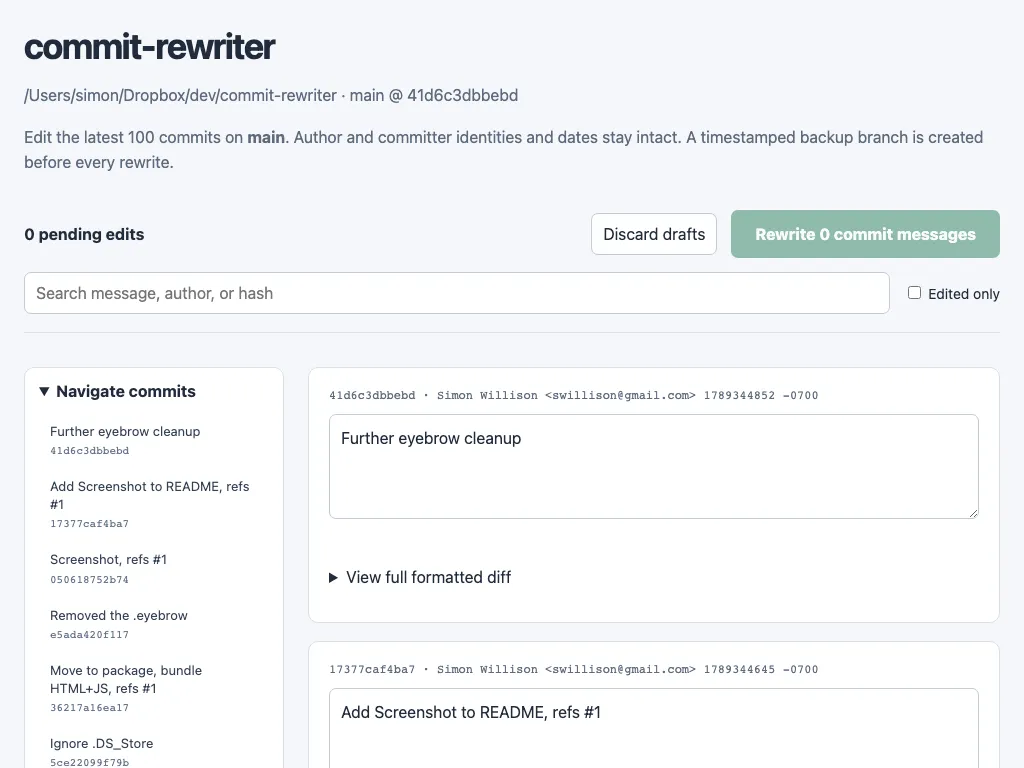
Image: Simon Willison
Why it mattersTeams that let coding agents write commits still want a clean public history when a private repository is published, and this gives them a single-step way to rewrite the record before pushing without writing a filter-branch script by hand.
Simon Willison released commit-rewriter 0.1 on 14 September, a local web application that lets a developer batch-edit the commit messages in a Git repository before pushing them anywhere public. The release is signed and available from PyPI under Apache 2.0. Willison wrote it while preparing the Datasette security releases, whose private commit history he described as "full of coding agent cruft and references to issue IDs from our private repository, so they weren't fit for publication".
The problem it names
The workflow it addresses will be familiar to anyone releasing code from a private repository where an agent wrote the commits. A coding agent produces a commit for every step of a task, and the resulting messages carry template phrasing, references to internal tracker IDs, and boilerplate that only makes sense in the private context. When the change reaches a public release, that history is either published as is, cleaned by hand, or replaced with a squash. Willison's own case was the Datasette security releases, where the commit history is read by downstream maintainers and needed to be readable without exposing the private issue tracker.
commit-rewriter turns that clean-up into a single step. It runs against a local repository and opens a web UI on the developer's own machine at a loopback address, with a sidebar of recent commits and a text area for editing each message. A search box filters by message, author, or hash, and an "edited only" checkbox narrows the view to pending drafts. A View full formatted diff toggle sits on every commit so the editor can see what the change actually did before rewriting the description.
What happens on submit
When the developer clicks Rewrite commit messages, the tool first creates a timestamped branch pointing at the current state of the repository, then rewrites every commit from the earliest edited message through the tip. The backup branch is what makes the operation reversible: if the rewrite is wrong, the developer resets the working branch back to that timestamped ref and starts over. Willison describes this as the mechanism "to allow you to revert if you need to".
The scope of the rewrite is deliberately narrow. It edits messages, not diffs, so nothing about the code content changes. It works on the local repository only, so nothing reaches a remote until the developer pushes. And it defaults to a loopback address, so the web UI is not exposed on the network.
Where it fits
For a team using Claude Code, Codex, or another coding agent that commits after each edit, this sits between "the agent produced 40 commits that pass tests" and "we are ready to publish this history to a public repository or a customer release". The alternatives are interactive rebase, which is slow across a batch that size, and squashing everything into one commit, which throws away the step-by-step record a future reader might want.
At 0.1 this is one developer's tool with 1 star and 18 commits, so nobody should treat it as tested at scale. Willison has a history of small utilities that stay small and get used: the same author made shot-scraper, llm, and Datasette itself.
Source
Primary source: commit-rewriter 0.1 release on GitHub. Willison's own post: commit-rewriter 0.1 on simonwillison.net. Repository: simonw/commit-rewriter.
This item was written by an AI system from the linked source. Reveneau is responsible for what it publishes.
Get AI News in your inbox
New developer tools, model and agent releases, and how teams are actually using them to release software. Short, and only when there is something worth reading.