Image: Brangus
Why it mattersLocal AI runs when the network is down. Showing the source behind every answer makes a wrong answer easier to catch.
Reaching the paid AI chat you use most is a plan until the connection goes. Survival LLM is a free app for Mac and Windows that runs an AI model on your own computer. It bundles about 930,000 Wikipedia articles and other emergency and how-to references for offline use. The Hacker News thread had 146 points when checked.
The app is MIT-licensed. The GitHub repo is anonnerdfrenzy/survival-llm, with 140 stars at the time of writing. The repo lists Brangus.io as the project site. The Mac download is 212 MB. The Windows download is 25 MB. Setup takes 20 minutes to about two and a half hours. Most of that time is downloading.
Which model it picks for your computer
The app checks your memory on first run and downloads the model that fits. Four options are listed on the site, each paired with a hardware class. A Mac with 128 GB of memory or more gets NVIDIA Nemotron 3.5 Super at 80 GB. A Mac with 32 to 96 GB gets Qwen3.8 27B at 18 GB. A Windows PC with 32 GB or more gets NVIDIA Nemotron 3.5 Lightning at 25 GB. A Mac or PC with 16 to 31 GB gets IBM Granite 4.2 8B at 6 GB.
Brangus reports a blind test on 22 blackout and first-aid questions. Each answer was graded on whether the model got the main point of official guidance right. The top three models scored 21, 21 and 19 out of 22. The 8B model scored 14 out of 22. Those are Brangus's own figures, measured on an earlier build of the library.
What is in the offline library
The library is 9 GB to download and 19 GB installed. A smaller version drops Wikipedia and iFixit. It is 1.3 GB to download and 3 GB installed. Each source keeps its own licence, shown with every article.
Named on the site: WikiMed, MedlinePlus from the U.S. National Library of Medicine, the UK Medicines A to Z, and the WikEM emergency medicine wiki. Also Ready.gov guides from FEMA, CDC travelers' health, and U.S. military medicine and survival manuals. Then wikiHow, iFixit repair guides, Appropedia and Stack Exchange Q&A on home repair, cooking, gardening, the outdoors and ham radio.
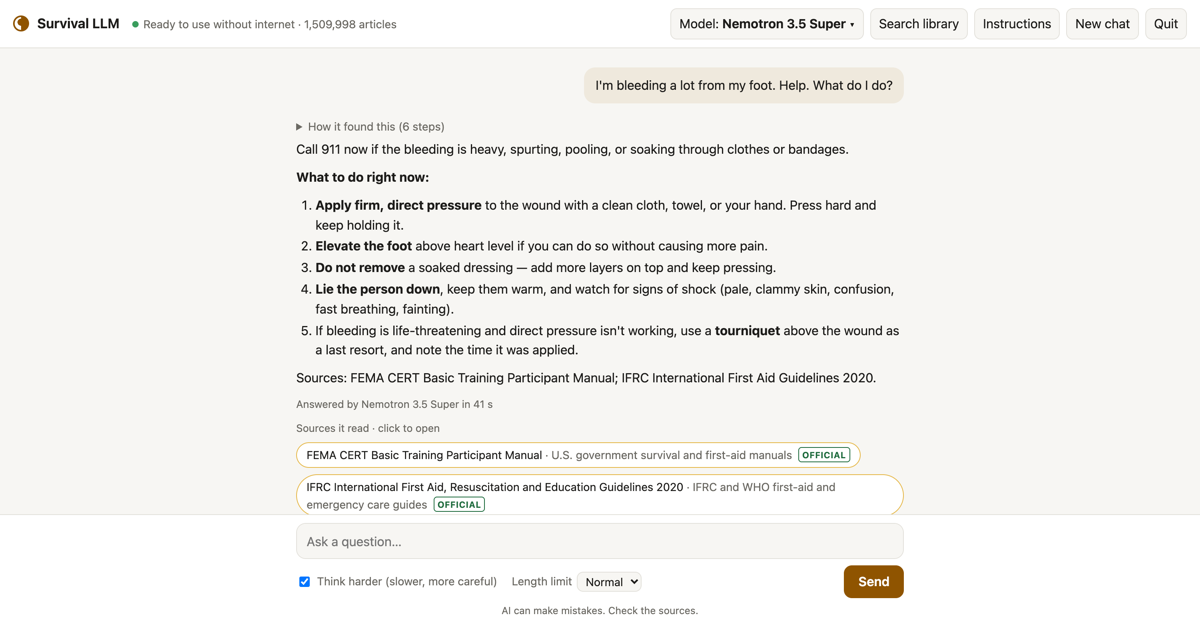
Every answer lists the articles it read. The site says you can click a source to see the exact passage highlighted.
Battery, privacy and limits
The site says the app draws about 100 watts on a MacBook Pro while it answers. Answers take 5 to 40 seconds each. Brangus says a full battery handles 100 to 300 questions. The number was measured on one laptop. Mac needs Apple Silicon and macOS 14 or newer. Windows needs 64-bit Windows 10 or 11.
Nothing you ask leaves your computer. The app has no account and no tracking. You can add PDFs, Word documents, ebooks and personal notes, which the AI searches alongside the library.
Small models make more mistakes, which is why every answer shows its source. A reader relying on it in a real emergency should check the cited passage.
What this changes for a user of ChatGPT or Claude
The cloud assistant leaves when the connection goes. Survival LLM is a free second seat that keeps working. It is slower, smaller and worse than a frontier model. It is also free of a subscription and free of a network. Two uses stand out, both stated on the site: emergency reference, and private questions you would rather not send anywhere.
Source
Survival LLM, Brangus. anonnerdfrenzy/survival-llm, the GitHub repository. Hacker News thread.
This item was written by an AI system from the linked source. Reveneau is responsible for what it publishes.
Get AI News in your inbox
New developer tools, model and agent releases, and how teams are actually using them to release software. Short, and only when there is something worth reading.