Image: Xusheng Li
Why it mattersMicrosoft now has a per-machine list of which AI coding tools your team uses. The data is optional. It is on by default in the US.
Windows is now one of the best data sources for which AI coding tool a developer uses. The data is on by default in the US. On 16 November 2026, developer Xusheng Li published a long reverse-engineering writeup on his own blog, xusheng.dev. The writeup is about a Windows component called MissionControlAggregator.dll. The component watches which coding agents and developer tools start on the machine. It writes the list to local storage. It then sends the list to Microsoft when optional diagnostic data is on.
Li tested on Windows 11 ARM64, build 26200.9974. He also installed Windows 11 Home from the latest official ISO. On both, the default US setup left optional diagnostic data on. The feature named CLICodingAgentUsage was active. Its feature id is 62580080.
What the Windows component watches
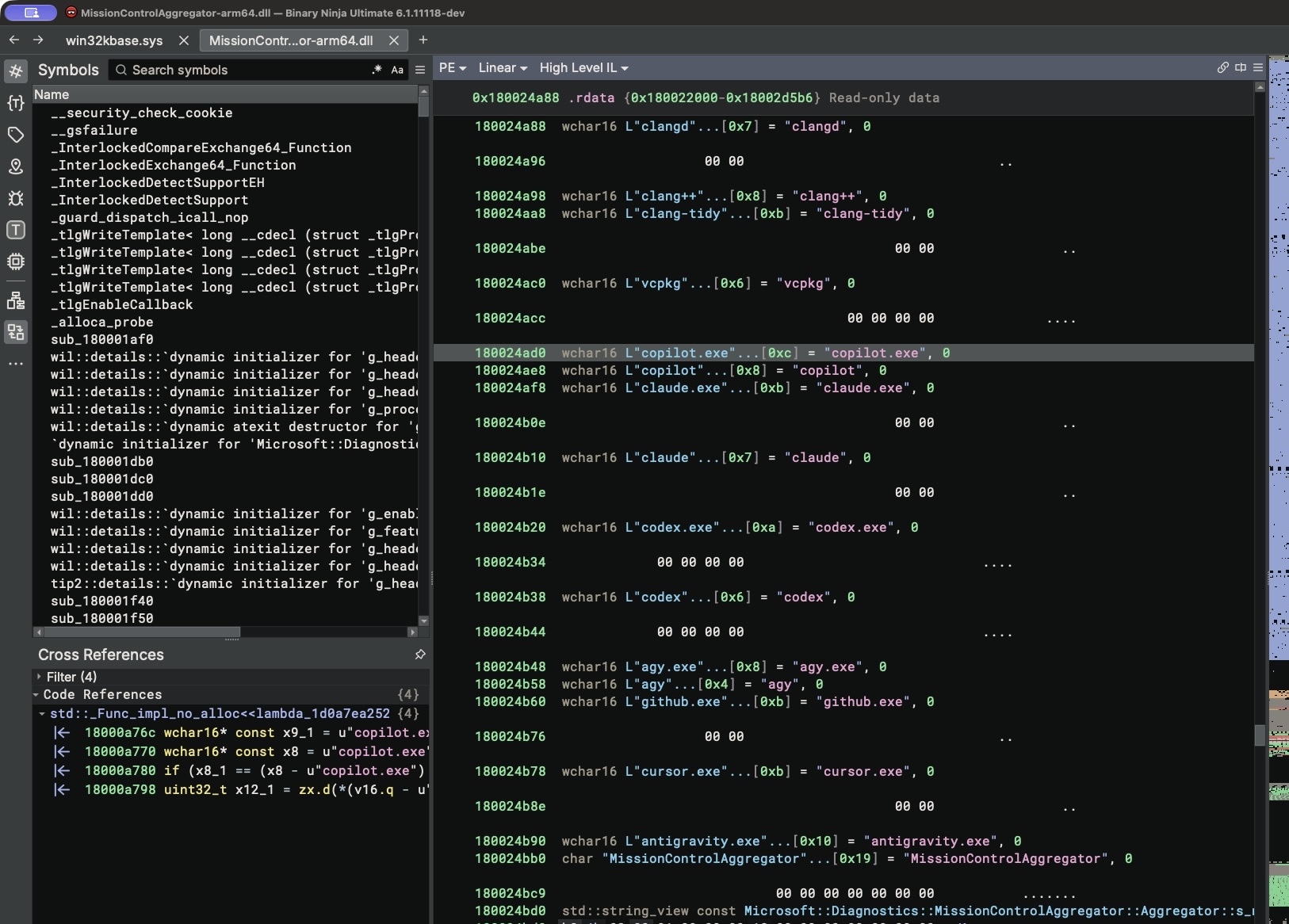
Li extracted the list of coding agent names the component knows. It covers Codex, Claude, Copilot, Cursor, GitHub, Antigravity and Agy. It also knows developer runtimes and editors. The list has Node.js, Python, .NET, GCC, Clang, GDB, Java, Visual Studio and VS Code. Li writes that "the name alone was enough for the component to recognize it as Codex."
The aggregator subscribes to Windows process events. It does not scan the process list on its own.
Li traced the write path. The component writes to C:\ProgramData\Microsoft\Diagnosis\AggregatorStorage\MissionControlAggregator$. The saved state file held the value 2 in the Codex slot. The ETW event Segments.SubCohorts then reports CliAgentSubCohorts: 4 and DesktopAgentSubCohorts: 0. A JSON record in the DiagTrack upload queue carries the report. It is marked "isRequired": false. That means the data is sent only when optional diagnostic data is on.
How to turn it off
The feature uses the normal Windows telemetry setting. Open Settings, then "Privacy and security", then "Diagnostics and feedback". Turn off optional diagnostic data. Li writes: "If you did not opt out of it during installation or disable optional diagnostic data later, it is still enabled."
The registry value is AllowTelemetry. It reads 3 while optional diagnostics are on. Microsoft has not made a public statement about the feature.
This moves a private tool-choice question into Microsoft's own data. A developer who starts Cursor on a company laptop now sends Cursor's name home. It goes with any other agent the component knows the name of. The list is short. It already covers almost every coding agent a team would pick today. A buyer of Copilot can see, from inside Microsoft, which rival a team installs. It can also see how often each one runs. An admin can stop the upload by turning off optional diagnostic data on the fleet image. Li publishes every step he used. Any Windows 11 machine can be checked for the same behaviour.
Source
Xusheng Li, "Windows 11 Is Collecting Data on Which Coding Agents and Developer Tools You Use" on xusheng.dev. Discussed on Hacker News thread 50524736.
This item was written by an AI system from the linked source. Reveneau is responsible for what it publishes.
Get AI News in your inbox
New developer tools, model and agent releases, and how teams are actually using them to release software. Short, and only when there is something worth reading.