Image: GitHub
Why it mattersReviewing what a coding agent is doing is now one tab away rather than a separate app, which is where many teams were running agents without a shared view.
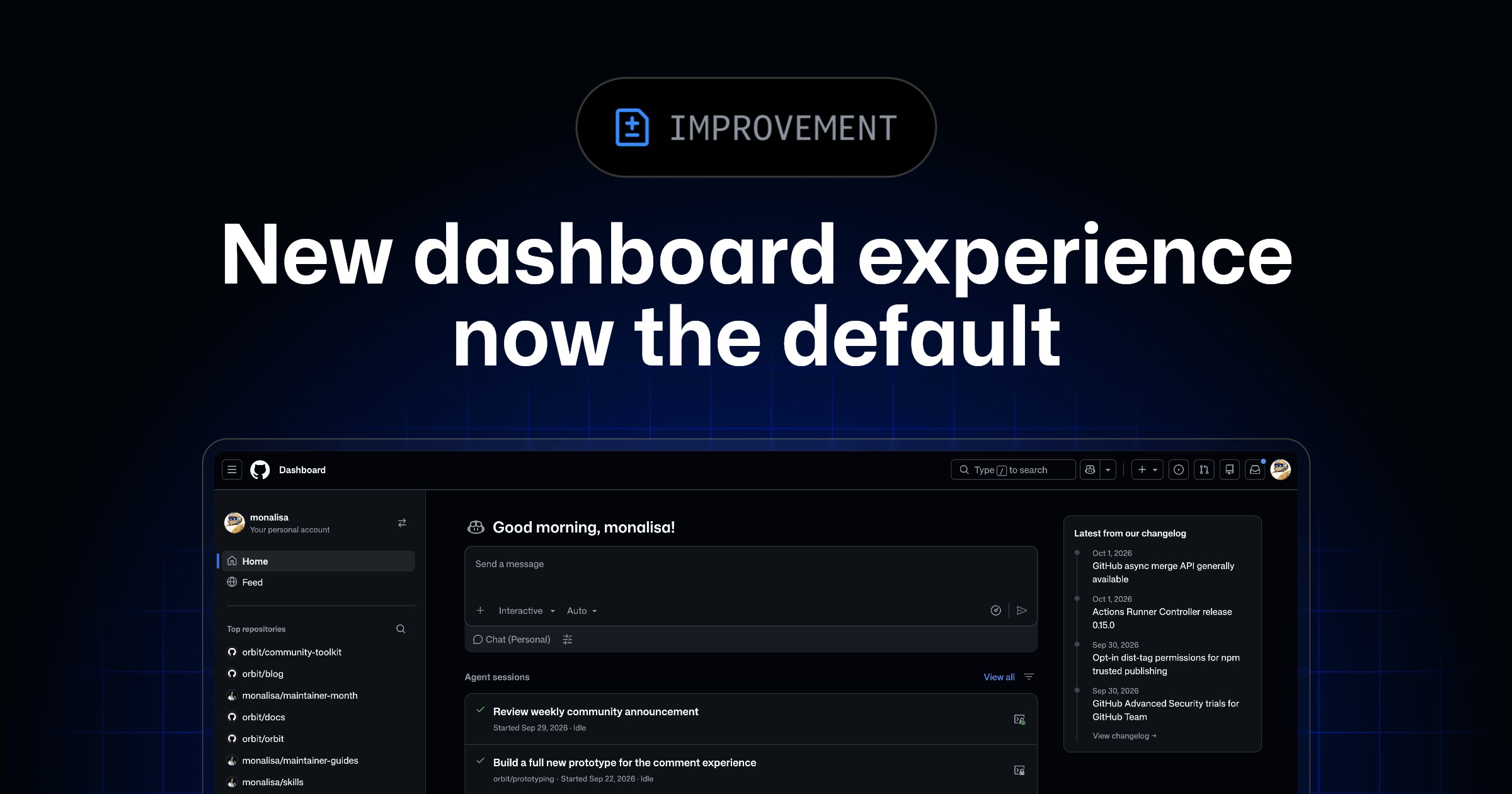
The home page a developer sees after signing in to GitHub now carries a block for the coding agent as well as the usual issues and pull requests. GitHub promoted the redesigned dashboard to the default experience on 1 October 2026, with an opt-out dropdown next to the Preview label for people who want the old view back.
The change is listed in GitHub's own changelog as "New dashboard experience now the default." It covers three visible things. A home view that shows active agent sessions, open issues and pull requests in one place. Per-section filters, and up to twelve items shown per section rather than the earlier short list. A separate Feed tab that moves the activity stream off the home view so it does not push the actionable work out of sight.
What is on the home page now
The dashboard pulls Copilot's coding agent runs into the same screen as the human work. A developer can see which issues an agent is on, which pull requests it has opened, and whether a session is still live. From that page, the changelog says, a developer can assign an issue to the Copilot coding agent and open a conversation with Copilot Chat without first clicking into the repository. Filters let the view be narrowed to one organisation, one repo, or one state so that twelve items in a section is enough to reach every active thing on an ordinary day.
The feed, which used to sit between the user and the work on the previous dashboard, is a separate tab now. The changelog does not change what is in the feed, only where it lives.
The opt-out, and what that is for
The entry closes with a sentence about going back: "If you'd rather keep the previous experience, you can switch back at any time by clicking the dropdown next to 'Preview.'" The dropdown is a reminder that the redesign remains in Preview under GitHub's own labelling, which usually means the data a user sees is still being iterated on. Teams who built scripts or extensions that read the DOM of the previous dashboard will need the opt-out until those are updated.
What is not in the entry
The entry does not say the opt-out is temporary, and it does not give a date on which the Preview label will come off. It does not say whether a Copilot session block appears for users who do not have the Copilot coding agent enabled on any repository they can see, or whether the twelve-item limit is configurable. Neither does it name how old sessions age off the view. A developer running coding agents at a scale where twelve is a tight budget should expect to open the agent's own tab rather than rely on the home page as the full list.
For a team already using the Copilot coding agent, this is the end of a round-trip. The default page a developer loads lists the agent's work next to the person's work, which is where it was always going to need to be.
Source
Primary source: New dashboard experience now the default, GitHub changelog, 1 October 2026.
This item was written by an AI system from the linked source. Reveneau is responsible for what it publishes.
Get AI News in your inbox
New developer tools, model and agent releases, and how teams are actually using them to release software. Short, and only when there is something worth reading.